

In this guide, you will learn how to earn Loyalty Points through Shopping towards status with American Airlines

Watch the video or read below
Begin by signing up for AAdvantage eShopping using your AAdvantage account.
The AAdvantage eShopping portal (powered by Cartera) has over 1,000 merchants. You earn miles which convert to Loyalty Points. For example, if you make a purchase for $299 (before tax & shipping) at Macy’s at 5 miles/dollar, you would earn 1,495 AAdvantage Miles and 1,495 Loyalty Points.
If you make that purchase with a co-branded American Airlines credit card, you will earn additional miles and Loyalty Points. For example, if you have the Aviator Red World Mastercard, you would earn 1 AAdvantage mile for every dollar.
With both, you would earn about 1,800 AAdvantage miles and 1,800 Loyalty Points total for the purchase. Remember, miles can be redeemed, while Loyalty Points are for earning status.
If you make a purchase and the earnings rate goes up, you can generally cancel and place a new order. Be sure to carefully read the terms of each merchant.
Lastly, since AAdvantage eShopping uses affiliate-based tracking, you can use any card to pay.
Product Search
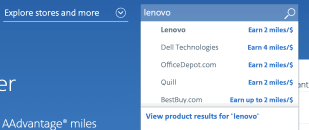
While you can find your favorite stores and brands on the AAdvantage eShopping portal, you can also search for products. For example, if you’re in the market for a new Lenovo laptop, you can search for Lenovo and click on Product Results to see other merchants who sell the product.
Best Practices
The AAdvantage eShopping portal has been known to be very sensitive to “last-touch” during shopping. This means it’s important to follow these best practices outlined in the FAQ to decrease the chances of issues.
Frequently Asked Questions
If you had missing miles from AAdvantage eShopping that posted late and you were refused status or a reward, send an e-mail to [email protected] with the subject “Dispute with American Airlines & Cartera (AAdvantage eShopping).” You can use the template below.
To whom it may concern,
As you may already know, Cartera takes significant time to investigate missing miles requests for transactions through AAdvantage eShopping. Along with each investigation, Cartera states via e-mail:
“We understand that there might be a concern that the reward for this order will post after your AA deadline to achieve or maintain Status on your American Airlines account. Please note that American Airlines posts rewards to member accounts using the transaction date, so any rewards posting after the deadline with a transaction date on or before the deadline will still be counted towards your Status.”
This wording leads me and many others to believe that even though the AAdvantage program year ends on the last day of February each year, Loyalty Points posted after this date will still count for receiving status and rewards. However, American Airlines Customer Service will not give out exceptions for transactions posted after May 31.
If American Airlines is contracting with Cartera to provide an avenue of earning Loyalty Points but does not honor transactions that post late, then (1) language/terms need to be updated and (2) prevent Cartera from accepting transactions after December 31 to allow adequate time to investigate missing miles requests.
I would appreciate a response on how this will be mediated.
Thank you,
[YOUR NAME]
AAdvantage # [YOUR AADVANTAGE NUMBER]
If you have followed all the best practices outlined in What are the best practices for using AAdvantage eShopping, you may be able to escalate your missing miles case for additional review.
This may happen when AAdvantage eShopping responds with:
The merchant has concluded the research on this transaction and has notified us that this order is not eligible for rewards.
Merchants on our site attribute orders to the last touch and pay commissions to AAdvantage eShopping. We then convert that commission into rewards that we post to your account. In your case although you started the purchase while logged in to your eShopping account, the merchant has indicated that the last touch before you completed this transaction was not https://www.aadvantageeshopping.com and therefore the commission for this order did not track back to your eShopping account.
Based off this response, you can reply:
I would like to request an additional review by a supervisor. As evidenced by this recording [link to the screen recording], there is no possible way commissions were paid to any other affiliate.
Below are common practices and experiences with delivery based services such as Blue Apron, Daily Harvest, EveryPlate, Facator 75, Firstleaf, Green Chef, HelloFresh, or Naked Wines:
- Follow the best practices for AAdvantage eShopping
- Users may or may not see a banner at the end of the transaction
- Most users report receiving an e-mail confirmation within 24 hours that the order was tracked
- Users have reported their payment methods are charged when the order is shipped
- Points will not post until after the first delivery of the order, regardless of the displayed posting times (ome users have reported receiving points before the first delivery)
- Points can take up to 6-8 weeks to post after first delivery, however most users will submit a missing miles request through AAdvantage eShopping after first delivery
- After the first delivery, users skip other deliveries through the Delivery Service website
- Once points post, users will cancel the subscription through the Delivery Service website
- It is recommended to keep the service active if required by the terms and conditions (while skipping deliveries)
Churning
AAdvantage eShopping terms for these delivery services generally state one order per loyalty account, however, some users have reported being able to churn these delivery based services. First, by ensuring that the previous account is completely closed or canceled to prevent address verification. Second, by using a new account with a different e-mail address. Churn at your own risk.
Coupon or discount codes not found on the AAdvantage eShopping merchant listing will make the transaction ineligible for earnings.
American Airlines posts points to accounts based off the transaction date, so any points which post after the end of February will still count to that program year (e.g. a pre-paid hotel stay with a check-in of February 20, 2026 will count towards the 2025-2026 program year).
Users have reported successful tracking and posting of Loyalty Points when using the AAdvantage eShopping extension in Chrome on a laptop/desktop.
🎥 For larger point purchases, screen recording your checkout process is recommended in case Cartera says the purchase was not eligible:
- 🍎 Take screen recordings on Mac
- 🖥️ How to Screen Record in Windows 10 or Windows 11
- 📱 Record the screen on your iPhone, iPad, or iPod touch
- 📱 Record and capture your Galaxy phone or tablet’s screen
Then, carefully follow these steps:
- Disable ad-blockers and shopping browser extensions (e.g. Rakuten, Honey, CapitalOne Shopping, etc.) or shopping apps on your phone
- Log in to AAdvantage eShopping
- Open the merchant through AAdvantage eShopping
- Click through the offer on AAdvantage eShopping for the merchant
- Add all items to the cart/nearly complete the purchase process
- If applicable, log in to your account at the merchant
- Check your Recent store visits on AAdvantage eShopping activity after the initial visit to confirm functionality
- Click through again on AAdvantage eShopping for the merchant
- If the popup does not appear, try to open the AAdvantage eShopping extension (this may help to refresh the tracking)
- Complete the checkout/purchase process
- Users may or may not see a banner at the end of the transaction. If it appears, take a screenshot of the entire page

It may take up 24 hours for the transaction to appear in your Recent store visits on AAdvantage eShopping activity (it’s possible it does not appear). Use My Earnings to track your purchases.
If there is no activity under “Recent store visits” or “Recent transactions,” you can submit a request after 15 days for missing miles. Submit the recording of the transaction along with your receipt.
Points are considered posted when they appear in your AAdvantage account. Unless otherwise noted, the activity date will be the date of the transaction, regardless of when it is posted.
By program:
- Paid Surveys Online: Almost immediately (as long as 24 hours)
- Fuel Rewards: up to 7 business days after the sale (usually post overnight Thursday to Friday)
- Flights on AA: points post within 24 hours after completing the travel (usually within 1 hour after arriving). Purchases for flights with an AA co-branded card post after the close of your billing cycle each month. The activity date is the departure date of each segment.
- AAdvantage Hotels: 5-7 business days after the stay for prepaid bookings. In some cases, it can take up to 6 weeks. Allow up to 10 weeks for non-prepaid bookings. The activity date will be the check-in date.
- SimplyMiles (SM): users have reported that it varies significantly. Some earnings are posted the next day, others take a week or two, or longer.
- AAdvantage eShopping
- It will depend on the terms. Some post in a day, others in a week, or even after a 60-day period. With some merchants, you must wait until the order is picked up or delivered. Regardless, you will have to give at least 15 days. If it doesn’t post within 15 days, you submit a request for credit. Cartera will research the request and it may take 6-8 weeks to resolve (up to 6 months in extreme cases).
- Merchants typically don’t report earnings back to Cartera until the purchase has shipped, is picked up, or is completed. With some merchants, earnings may be split if items are shipped at different times.
- Information found under “Recent transactions” and “Recent store visits” should not be used to determine whether an activity has been correctly tracked or will post
- Days to Post information is available on some merchant pages (often is not reflective of actual time to post)
- Bonus miles via AAdvantage eShopping: bonus miles from promotions can take up to 10 weeks to post
- Hotels via AAdvantage eShopping: If you booked a hotel through AAdvantage eShopping, the booking date will be the transaction date.
- AAdvantage Dining: you will receive an e-mail within a day or two
- AA co-branded Cards: points earned through American Airlines co-branded credit cards are posted after the statement closes each month. Purchases that are made on or before February 28/29 will count for that program year. It may take up to 6 weeks for split billing points to post. Ensure that your AAdvantage # is added to your account
- AA Vacations: miles will post within 2 weeks after travel is complete. A mileage credit may appear in your account after travel for 0 miles but this is not the final amount.
Examples:
- If you book a hotel stay through AAdvantage Hotels for the future, the activity date will be the check-in date
- If your flight took place on February 28 and it doesn’t post until March 5, it counts towards the previous program year
- If you place a Blue Apron order on January 10 but it isn’t delivered until January 25, it will post with the January 10 date
- If you book a Viator activity on February 10, and the activity is in July, it will post with the February 10 date (after the completion of the activity)
The AAdvantage status earning program year starts March 1 and ends on the last day of February.
Navigate to My Account in AAdvantage eShopping, and check Recent store visits.
If you have followed the best practices outlined in the FAQ, you must wait at least 15 days for the order to track.