

In this guide, you will learn how to earn Loyalty Points through the card-linked offers
If you hold a card with American Express, Bank of America, Citi, Chase, PayPal, US Bank or Wells Fargo, you likely have access to merchant offers. These merchant offers (rebate programs) present targeted offers that you can activate. Offers vary from fixed rates (e.g. $10 back) to dynamic rates (e.g. 5% back).
It’s important to remember that offers are targeted and may not be presented to everyone. The more activity through your cards, the more likely offers appear.
After activating offers, you simply make a purchase at the merchant with the card. The bank tracks the transactions and matches them to the offers you’ve activated.
Note that card-based offers (including SimplyMiles) post separately.
Example
Below is an example of stacking card-based offers with the AAdvantage eShopping portal when using a Citi AAdvantage card:
SimplyMiles Offer
Activate HelloFresh offer for 930 Loyalty Points
Earn 930 Miles & Loyalty Points
Citi Merchant Offers
Activate HelloFresh offer for $10 Cash Back
Earn $10 cash back
AAdvantage eShopping
Click through the AAdvantage eShopping portal for HelloFresh
Earn 4,500 Miles & Loyalty Points
Citi AAdvantage Card
Pay for HelloFresh using your Citi AAdvantage Card for order total of $47.95
Earn 48 Miles & Loyalty Points (1 mile and 1 loyalty point for every $1 spent)
Total $37.95 after $10 cash back
Earn 5,478 Miles & Loyalty Points
Or in a table summary:
| Activity | Loyalty Points | Cost |
|---|---|---|
| Activate SimplyMiles offer (930 Miles & Loyalty Points) | 930 | – |
| Activate Citi Merchant Offers ($10 cash back on HelloFresh) | – | ($10) |
| Purchase HelloFresh through AAdvantage eShopping | 4,500 | $48 |
| Pay with Citi AAdvantage Card (earns 1 LP for each $1) | 48 | – |
| Total | 5,478 | $38 |
SimplyMiles
How to Earn
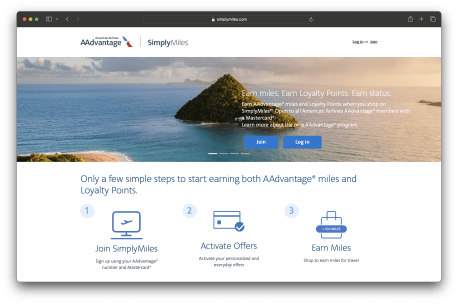
SimplyMiles is a card-linked offer program. Begin by signing up for Simply Miles using your AAdvantage account. After you join Simply Miles using your AAdvantage account, you navigate to your profile and add your Mastercard credit cards. Be sure to set your email preferences at the bottom of that page.
The Simply Miles program is designed for Mastercard holders. However, you can add non-Mastercard cards through the sister Dining program.
Initial offers through Simply Miles may take at least one week to appear. Once they are loaded in your account, there will be fixed and dynamic merchant offers. You will browse and “Add to card” any offers you want to use. Deals are refreshed weekly (typically on Fridays).
There are two main offer types: flat or dynamic. A flat offer means earning a fixed amount of miles for spending a certain amount (e.g. 1,500 miles on a purchase of $100 or more) and a dynamic offer means you earn a certain amount of miles per dollar spent. If you see a merchant offer which says “4 miles per $1 spent on any purchase” and you spend $25, you would earn 100 AAdvantage Miles and 100 Loyalty Points.
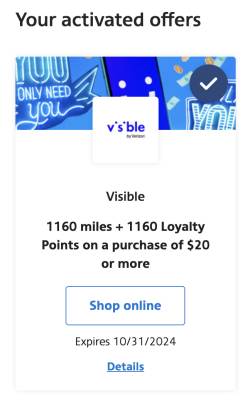
Below is an example of a fixed offer that earns 1,160 miles and 1,160 Loyalty Points on a single purchase of $20 or more.
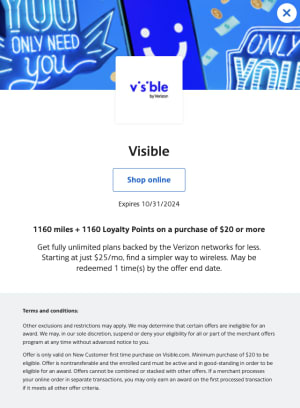
In the example below, the terms outline details such as how many times the deal can be used or the maximum miles earned.
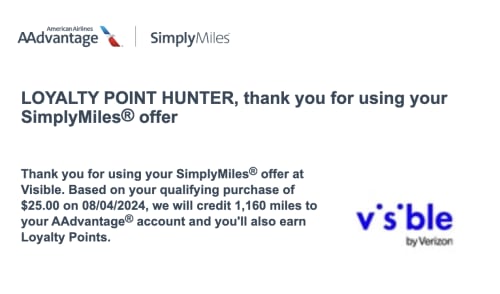
After the activity is tracked, you will receive an e-mail notifying you of the transaction:
Some of these merchants may also be a part of AAdvantage eShopping, which allows you to stack earnings. If you made a purchase through AAdvantage eShopping at the same merchant and made the purchase with a registered card, you would earn points from both programs.

With the merchant in the example above, you would earn 1,160 miles and Loyalty Points from SimplyMiles + 1,200 miles and Loyalty Points from AAdvantage eShopping, and up to 2 miles and Loyalty Points per dollar by using a co-branded American Airlines card.
Reminders
If you have any Mastercard gift cards, you can also add them to your account. SimplyMiles also acts as a card overflow if you wish to add more than 10 cards to AAdvantage Dining.
You are also able to add your partner’s cards to your SimplyMiles accounts. However, once added, you will have to contact customer service to have the card removed from your profile.
Frequently Asked Questions
Begin by completing the Contact form on simplymiles.com.
If selecting “Missing Reward (miles)” on the Contact form does not work, select “Other Inquiry.”
If you do not receive a response, you can alternatively try sending an email to customerservice (at) support.simplymiles.com.
Offers are loaded once a week into an account. The more cards that are added to the account, the more likely offers are to appear.
Points are considered posted when they appear in your AAdvantage account. Unless otherwise noted, the activity date will be the date of the transaction, regardless of when it is posted.
By program:
- Paid Surveys Online: Almost immediately (as long as 24 hours)
- Fuel Rewards: up to 7 business days after the sale (usually post overnight Thursday to Friday)
- Flights on AA: points post within 24 hours after completing the travel (usually within 1 hour after arriving). Purchases for flights with an AA co-branded card post after the close of your billing cycle each month. The activity date is the departure date of each segment.
- AAdvantage Hotels: 5-7 business days after the stay for prepaid bookings. In some cases, it can take up to 6 weeks. Allow up to 10 weeks for non-prepaid bookings. The activity date will be the check-in date.
- SimplyMiles (SM): users have reported that it varies significantly. Some earnings are posted the next day, others take a week or two, or longer.
- AAdvantage eShopping
- It will depend on the terms. Some post in a day, others in a week, or even after a 60-day period. With some merchants, you must wait until the order is picked up or delivered. Regardless, you will have to give at least 15 days. If it doesn’t post within 15 days, you submit a request for credit. Cartera will research the request and it may take 6-8 weeks to resolve (up to 6 months in extreme cases).
- Merchants typically don’t report earnings back to Cartera until the purchase has shipped, is picked up, or is completed. With some merchants, earnings may be split if items are shipped at different times.
- Information found under “Recent transactions” and “Recent store visits” should not be used to determine whether an activity has been correctly tracked or will post
- Days to Post information is available on some merchant pages (often is not reflective of actual time to post)
- Bonus miles via AAdvantage eShopping: bonus miles from promotions can take up to 10 weeks to post
- Hotels via AAdvantage eShopping: If you booked a hotel through AAdvantage eShopping, the booking date will be the transaction date.
- AAdvantage Dining: you will receive an e-mail within a day or two
- AA co-branded Cards: points earned through American Airlines co-branded credit cards are posted after the statement closes each month. Purchases that are made on or before February 28/29 will count for that program year. It may take up to 6 weeks for split billing points to post. Ensure that your AAdvantage # is added to your account
- AA Vacations: miles will post within 2 weeks after travel is complete. A mileage credit may appear in your account after travel for 0 miles but this is not the final amount.
Examples:
- If you book a hotel stay through AAdvantage Hotels for the future, the activity date will be the check-in date
- If your flight took place on February 28 and it doesn’t post until March 5, it counts towards the previous program year
- If you place a Blue Apron order on January 10 but it isn’t delivered until January 25, it will post with the January 10 date
- If you book a Viator activity on February 10, and the activity is in July, it will post with the February 10 date (after the completion of the activity)
The AAdvantage status earning program year starts March 1 and ends on the last day of February.